728x90
1. server.xml 설정
1) 단일인 경우 : ${CATALINA_HOME}/conf/server.xml
2) 멀티 인스턴스인 경우 : ${instance}/conf/server.xml
 <GlobalNamingResources>
    <!-- Editable user database that can also be used by
         UserDatabaseRealm to authenticate users
    -->
    <Resource name="jdbc/testDS"
              auth="Container"
              type="javax.sql.DataSource"
              maxTotal="100"
              maxIdle="30"
              maxWaitMillis="10000"
              username="testuser"
              password="testpassword"
              driverClassName="com.mysql.cj.jdbc.Driver"
              url="jdbc:mysql://${DB장비_IP}:3306/testdb"/>
  </GlobalNamingResources>
참고하면 좋은 내용으로, driverClassName="http://m.mysql.cj.jdbc.Driver"
이렇게 적는 경우는 connector.jar가 8 이상인 경우이며,
driverClassName="http://m.mysql.jdbc.Driver" 이렇게 적는 경우는 jar가 5버전인 경우이다.
context.xml 설정
1) 단일인 경우 : ${CATALINA_HOME}/conf/context.xml
2) 멀티 인스턴스인 경우 : ${instance}/conf/context.xml
<Context>

    <!-- Default set of monitored resources. If one of these changes, the    -->
    <!-- web application will be reloaded.                                   -->
    <WatchedResource>WEB-INF/web.xml</WatchedResource>
    <WatchedResource>WEB-INF/tomcat-web.xml</WatchedResource>
    <WatchedResource>${catalina.base}/conf/web.xml</WatchedResource>

    <!--ResourceLink 이 부분을 추가-->
    <ResourceLink global="jdbc/testDS" name="jdbc/testDS" type="javax.sql.DataSource"/>

    <!-- Uncomment this to enable session persistence across Tomcat restarts -->
    <!--
    <Manager pathname="SESSIONS.ser" />
    -->
</Context>
3. web.xml 설정
${배포애플리케이션}/WEB-INF/web.xml
<web-app xmlns="https://jakarta.ee/xml/ns/jakartaee"
  xmlns:xsi="http://www.w3.org/2001/XMLSchema-instance"
  xsi:schemaLocation="https://jakarta.ee/xml/ns/jakartaee
                      https://jakarta.ee/xml/ns/jakartaee/web-app_6_1.xsd"
  version="6.1"
  metadata-complete="true">

  <display-name>Welcome to Tomcat</display-name>
  <description>
     Welcome to Tomcat
  </description>

  <!-- resource-ref를 추가 -->
      <resource-ref>
        <description>MySQL Datasource</description>
        <res-ref-name>jdbc/testDS</res-ref-name>
        <res-type>javax.sql.DataSource</res-type>
        <res-auth>Container</res-auth>
    </resource-ref>

</web-app>
~
4. mysql connector.jar 파일 $CATALINA_HOME/lib에 추가
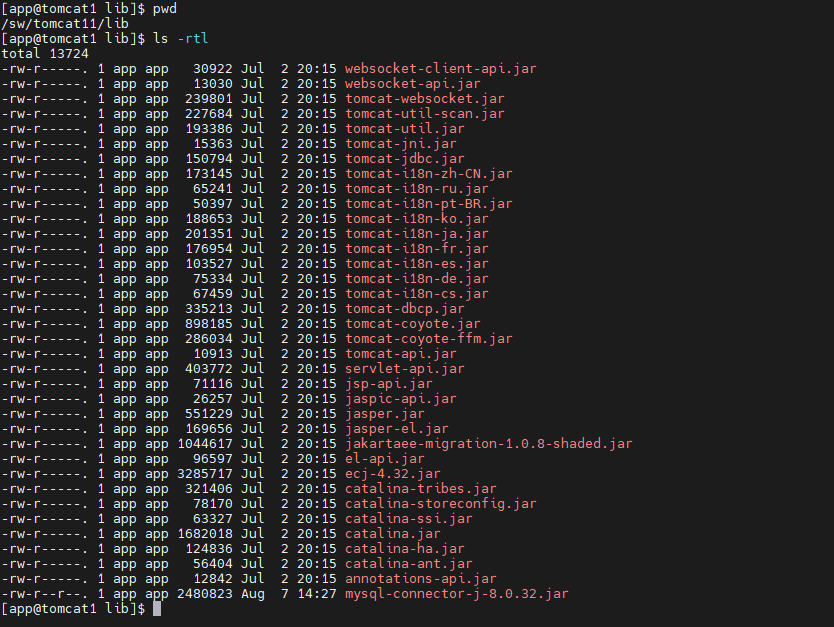
최하단의 mysql-connector-j-8.0.32.jar를 넣어줬다.
test.jsp
<%@ page import="java.sql.*, javax.naming.*, javax.sql.*" %>
<html>
<head>
    <title>Database Connection Test</title>
</head>
<body>
<%
    Connection conn = null;
    PreparedStatement pstmt = null;
    ResultSet rs = null;

    try {
        // JNDI 리소스 lookup
        InitialContext ctx = new InitialContext();
        DataSource ds = (DataSource) ctx.lookup("java:comp/env/jdbc/testDS");

        // 데이터베이스 연결
        conn = ds.getConnection();

        // 쿼리 실행
        String sql = "SELECT * FROM mytable";
        pstmt = conn.prepareStatement(sql);
        rs = pstmt.executeQuery();

        // 결과 출력
        out.println("<h1>Data from mytable:</h1>");
        out.println("<table border='1'>");
        out.println("<tr><th>ID</th><th>Name</th></tr>");
        while (rs.next()) {
            int id = rs.getInt("id");
            String name = rs.getString("name");
            out.println("<tr><td>" + id + "</td><td>" + name + "</td></tr>");
        }
        out.println("</table>");
    } catch (NamingException e) {
        e.printStackTrace();
        out.println("JNDI lookup failed: " + e.getMessage());
    } catch (SQLException e) {
        e.printStackTrace();
        out.println("SQL error: " + e.getMessage());
    } finally {
        // 리소스 해제
        if (rs != null) try { rs.close(); } catch (SQLException e) { e.printStackTrace(); }
        if (pstmt != null) try { pstmt.close(); } catch (SQLException e) { e.printStackTrace(); }
        if (conn != null) try { conn.close(); } catch (SQLException e) { e.printStackTrace(); }
    }
%>
</body>
</html>'WAS > TOMCAT' 카테고리의 다른 글
| [Tomcat9] 마이너 버전 업그레이드 정리 (5) | 2025.07.21 |
|---|---|
| [tomcat9] web application 배포에 관련하여 (3) | 2025.07.18 |
| Session Clustering (멀티캐스트 아닌 방식) (0) | 2024.08.21 |
| appBase, docBase (0) | 2024.08.07 |
| 톰캣 멀티 인스턴스 구성 (0) | 2024.08.07 |


