===
https://tomcat.apache.org/migration-9.html#Tomcat_9.0.x_noteable_changes
===
이 글의 맨 위에 작성된 가이드 문서에서 하단에 버전을 넣고 diff를 돌리면 무엇이 바뀌었는지 확인을 할 수 있다.
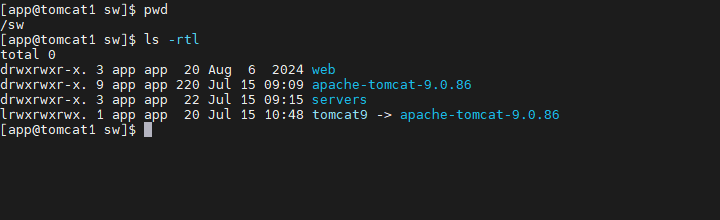
업그레이드를 하고자 하는 구조의 현재 상황은 다음과 같다.
엔진 경로(/sw/apache-tomcat-9.0.86)가 있고, 엔진 경로를 바라보는 심볼릭 링크 경로가 있다.(/sw/tomcat9)
그리고 /sw/servers 경로는 톰캣의 멀티 인스턴스를 위한 경로이다.
일단 apache-tomcat-9.0.86 과 apache-tomcat-9.0.107 에 대해서 diff 명령어를 통해 확인해보면 다음과 같은 점이 차이가 있다.
(BUILDING.txt, README 와 같은 파일은 제외.)
목표 : apache-tomcat-9.0.86 에서 apache-tomcat-9.0.107로 업그레이드
Common subdirectories: apache-tomcat-9.0.107/bin and apache-tomcat-9.0.86/bin
Common subdirectories: apache-tomcat-9.0.107/lib and apache-tomcat-9.0.86/lib
Common subdirectories: apache-tomcat-9.0.107/logs and apache-tomcat-9.0.86/logs
Common subdirectories: apache-tomcat-9.0.107/temp and apache-tomcat-9.0.86/temp
Common subdirectories: apache-tomcat-9.0.107/webapps and apache-tomcat-9.0.86/webapps
Common subdirectories: apache-tomcat-9.0.107/work and apache-tomcat-9.0.86/work
$CATALINA_HOME/bin
[app@tomcat1 sw]$ diff apache-tomcat-9.0.107/bin apache-tomcat-9.0.86/bin
Binary files apache-tomcat-9.0.107/bin/bootstrap.jar and apache-tomcat-9.0.86/bin/bootstrap.jar differ
diff apache-tomcat-9.0.107/bin/catalina.bat apache-tomcat-9.0.86/bin/catalina.bat
222,228d221
< rem Disable the global canonical file name cache to protect against CVE-2024-56337
< rem Note: The cache is disabled by default in Java 12 to 20 inclusive
< rem       The cache is removed in Java 21 onwards
< rem Need to set this here as java.io.FileSystem caches this in a static field during class
< rem initialisation so it needs to be set before any file system access
< set "JAVA_OPTS=%JAVA_OPTS% -Dsun.io.useCanonCaches=false"
<
246c239
< rem Configure JAVA 9 specific start-up parameters - ensure to keep it in line with service.bat
---
> rem Configure JAVA 9 specific start-up parameters
248,249d240
< set "JDK_JAVA_OPTIONS=%JDK_JAVA_OPTIONS% --add-opens=java.base/java.lang.invoke=ALL-UNNAMED"
< set "JDK_JAVA_OPTIONS=%JDK_JAVA_OPTIONS% --add-opens=java.base/java.lang.reflect=ALL-UNNAMED"
diff apache-tomcat-9.0.107/bin/catalina.sh apache-tomcat-9.0.86/bin/catalina.sh
271,277d270
< # Disable the global canonical file name cache to protect against CVE-2024-56337
< # Note: The cache is disabled by default in Java 12 to 20 inclusive
< #       The cache is removed in Java 21 onwards
< # Need to set this here as java.io.FileSystem caches this in a static field during class
< # initialisation so it needs to be set before any file system access
< JAVA_OPTS="$JAVA_OPTS -Dsun.io.useCanonCaches=false"
<
335,336d327
< JDK_JAVA_OPTIONS="$JDK_JAVA_OPTIONS --add-opens=java.base/java.lang.invoke=ALL-UNNAMED"
< JDK_JAVA_OPTIONS="$JDK_JAVA_OPTIONS --add-opens=java.base/java.lang.reflect=ALL-UNNAMED"
Binary files apache-tomcat-9.0.107/bin/commons-daemon.jar and apache-tomcat-9.0.86/bin/commons-daemon.jar differ
Binary files apache-tomcat-9.0.107/bin/commons-daemon-native.tar.gz and apache-tomcat-9.0.86/bin/commons-daemon-native.tar.gz differ
Binary files apache-tomcat-9.0.107/bin/tomcat-juli.jar and apache-tomcat-9.0.86/bin/tomcat-juli.jar differ
Binary files apache-tomcat-9.0.107/bin/tomcat-native.tar.gz and apache-tomcat-9.0.86/bin/tomcat-native.tar.gz differ
bin 디렉토리에서는 catalina.sh 과 *.jar 파일의 교체가 필요해 보인다.
catalina.sh 상에 JAVA OPTIONS나 CATALINA OPTS를 선언했다면,
설정한 내용들은 신규 버전의 catalina.sh에 옮겨오자.
$CATALINA_HOME/lib
[app@tomcat1 sw]$ diff ./apache-tomcat-9.0.107/lib/ ./apache-tomcat-9.0.86/lib/
Binary files ./apache-tomcat-9.0.107/lib/annotations-api.jar and ./apache-tomcat-9.0.86/lib/annotations-api.jar differ
Binary files ./apache-tomcat-9.0.107/lib/catalina-ant.jar and ./apache-tomcat-9.0.86/lib/catalina-ant.jar differ
Binary files ./apache-tomcat-9.0.107/lib/catalina-ha.jar and ./apache-tomcat-9.0.86/lib/catalina-ha.jar differ
Binary files ./apache-tomcat-9.0.107/lib/catalina.jar and ./apache-tomcat-9.0.86/lib/catalina.jar differ
Binary files ./apache-tomcat-9.0.107/lib/catalina-ssi.jar and ./apache-tomcat-9.0.86/lib/catalina-ssi.jar differ
Binary files ./apache-tomcat-9.0.107/lib/catalina-storeconfig.jar and ./apache-tomcat-9.0.86/lib/catalina-storeconfig.jar differ
Binary files ./apache-tomcat-9.0.107/lib/catalina-tribes.jar and ./apache-tomcat-9.0.86/lib/catalina-tribes.jar differ
Binary files ./apache-tomcat-9.0.107/lib/el-api.jar and ./apache-tomcat-9.0.86/lib/el-api.jar differ
Binary files ./apache-tomcat-9.0.107/lib/jasper-el.jar and ./apache-tomcat-9.0.86/lib/jasper-el.jar differ
Binary files ./apache-tomcat-9.0.107/lib/jasper.jar and ./apache-tomcat-9.0.86/lib/jasper.jar differ
Binary files ./apache-tomcat-9.0.107/lib/jaspic-api.jar and ./apache-tomcat-9.0.86/lib/jaspic-api.jar differ
Binary files ./apache-tomcat-9.0.107/lib/jsp-api.jar and ./apache-tomcat-9.0.86/lib/jsp-api.jar differ
Binary files ./apache-tomcat-9.0.107/lib/servlet-api.jar and ./apache-tomcat-9.0.86/lib/servlet-api.jar differ
Binary files ./apache-tomcat-9.0.107/lib/tomcat-api.jar and ./apache-tomcat-9.0.86/lib/tomcat-api.jar differ
Only in ./apache-tomcat-9.0.107/lib/: tomcat-coyote-ffm.jar
Binary files ./apache-tomcat-9.0.107/lib/tomcat-coyote.jar and ./apache-tomcat-9.0.86/lib/tomcat-coyote.jar differ
Binary files ./apache-tomcat-9.0.107/lib/tomcat-dbcp.jar and ./apache-tomcat-9.0.86/lib/tomcat-dbcp.jar differ
Binary files ./apache-tomcat-9.0.107/lib/tomcat-i18n-cs.jar and ./apache-tomcat-9.0.86/lib/tomcat-i18n-cs.jar differ
Binary files ./apache-tomcat-9.0.107/lib/tomcat-i18n-de.jar and ./apache-tomcat-9.0.86/lib/tomcat-i18n-de.jar differ
Binary files ./apache-tomcat-9.0.107/lib/tomcat-i18n-es.jar and ./apache-tomcat-9.0.86/lib/tomcat-i18n-es.jar differ
Binary files ./apache-tomcat-9.0.107/lib/tomcat-i18n-fr.jar and ./apache-tomcat-9.0.86/lib/tomcat-i18n-fr.jar differ
Binary files ./apache-tomcat-9.0.107/lib/tomcat-i18n-ja.jar and ./apache-tomcat-9.0.86/lib/tomcat-i18n-ja.jar differ
Binary files ./apache-tomcat-9.0.107/lib/tomcat-i18n-ko.jar and ./apache-tomcat-9.0.86/lib/tomcat-i18n-ko.jar differ
Binary files ./apache-tomcat-9.0.107/lib/tomcat-i18n-pt-BR.jar and ./apache-tomcat-9.0.86/lib/tomcat-i18n-pt-BR.jar differ
Binary files ./apache-tomcat-9.0.107/lib/tomcat-i18n-ru.jar and ./apache-tomcat-9.0.86/lib/tomcat-i18n-ru.jar differ
Binary files ./apache-tomcat-9.0.107/lib/tomcat-i18n-zh-CN.jar and ./apache-tomcat-9.0.86/lib/tomcat-i18n-zh-CN.jar differ
Binary files ./apache-tomcat-9.0.107/lib/tomcat-jdbc.jar and ./apache-tomcat-9.0.86/lib/tomcat-jdbc.jar differ
Binary files ./apache-tomcat-9.0.107/lib/tomcat-jni.jar and ./apache-tomcat-9.0.86/lib/tomcat-jni.jar differ
Binary files ./apache-tomcat-9.0.107/lib/tomcat-util.jar and ./apache-tomcat-9.0.86/lib/tomcat-util.jar differ
Binary files ./apache-tomcat-9.0.107/lib/tomcat-util-scan.jar and ./apache-tomcat-9.0.86/lib/tomcat-util-scan.jar differ
Binary files ./apache-tomcat-9.0.107/lib/tomcat-websocket.jar and ./apache-tomcat-9.0.86/lib/tomcat-websocket.jar differ
Binary files ./apache-tomcat-9.0.107/lib/websocket-api.jar and ./apache-tomcat-9.0.86/lib/websocket-api.jar differ
lib 경로는 이정도면 lib 경로 자체를 바꿔치기 해야 할 것으로 보인다.
Only in 이라는 메시지도 그렇고..
그리고 인스턴스 단위의 lib가 아닌 엔진 단에 공통적으로 사용하는 lib(ex. ojdbc8.jar)를 올린 경우,
신규 엔진의 lib경로에 기존 lib 경로에 위치한 library 파일들을 반드시 옮겨 둘 것.
$CATALINA_HOME/webapps
[app@tomcat1 sw]$ diff apache-tomcat-9.0.107/webapps apache-tomcat-9.0.86/webapps
Common subdirectories: apache-tomcat-9.0.107/webapps/docs and apache-tomcat-9.0.86/webapps/docs
Common subdirectories: apache-tomcat-9.0.107/webapps/examples and apache-tomcat-9.0.86/webapps/examples
Common subdirectories: apache-tomcat-9.0.107/webapps/host-manager and apache-tomcat-9.0.86/webapps/host-manager
Common subdirectories: apache-tomcat-9.0.107/webapps/manager and apache-tomcat-9.0.86/webapps/manager
Common subdirectories: apache-tomcat-9.0.107/webapps/ROOT and apache-tomcat-9.0.86/webapps/ROOT
이렇게 나오는데, 사실 이건 톰캣의 샘플성 페이지들이기에 크게 신경쓰지 않아도 될 거 같다.
conf/catalina.properties
diff apache-tomcat-9.0.86/conf/catalina.properties apache-tomcat-9.0.107/conf/catalina.properties
180a181
> tomcat-coyote-ffm.jar
이런 식으로 버전이 업그레이드 됨에 따라 추가되는 library들이 있을 수 있으니,
catalina.properties는 신규 버전의 파일을 들고오자
conf/server.xml
이걸 작성하는 알파요 오메가요..
diff apache-tomcat-9.0.86/conf/server.xml apache-tomcat-9.0.107/conf/server.xml
27,28c27,30
<   <!-- APR library loader. Documentation at /docs/apr.html -->
<   <Listener className="org.apache.catalina.core.AprLifecycleListener" SSLEngine="on" />
---
>   <!-- APR connector and OpenSSL support using Tomcat Native -->
>   <Listener className="org.apache.catalina.core.AprLifecycleListener" />
>   <!-- OpenSSL support using FFM API from Java 22 -->
>   <!-- <Listener className="org.apache.catalina.core.OpenSSLLifecycleListener" /> -->
97c99
<                          type="RSA" />
---
>                          certificateKeystorePassword="changeit" type="RSA" />
이렇게 바뀐 부분들이 있는데, 현재의 구성이 테스트 환경이지만, 이 작업을 할 때는 터미널 두 개를 열어두고 작업하는게 편했다.
기존에 사용하던 server.xml에 작성된 내용은 신규 버전의 server.xml에 작성해주면 된다.
conf/context.xml
<!-- OLD context.xml -->

<?xml version="1.0" encoding="UTF-8"?>
<!--
  Licensed to the Apache Software Foundation (ASF) under one or more
  contributor license agreements.  See the NOTICE file distributed with
  this work for additional information regarding copyright ownership.
  The ASF licenses this file to You under the Apache License, Version 2.0
  (the "License"); you may not use this file except in compliance with
  the License.  You may obtain a copy of the License at

      http://www.apache.org/licenses/LICENSE-2.0

  Unless required by applicable law or agreed to in writing, software
  distributed under the License is distributed on an "AS IS" BASIS,
  WITHOUT WARRANTIES OR CONDITIONS OF ANY KIND, either express or implied.
  See the License for the specific language governing permissions and
  limitations under the License.
-->
<!-- The contents of this file will be loaded for each web application -->
<Context>

    <!-- Default set of monitored resources. If one of these changes, the    -->
    <!-- web application will be reloaded.                                   -->
    <WatchedResource>WEB-INF/web.xml</WatchedResource>
    <WatchedResource>WEB-INF/tomcat-web.xml</WatchedResource>
    <WatchedResource>${catalina.base}/conf/web.xml</WatchedResource>
    <ResourceLink global="jdbc/dodomainDS" name="jdbc/dodomainDS" type="javax.sql.DataSource"/>

    <!-- Uncomment this to disable session persistence across Tomcat restarts -->
    <!--
    <Manager pathname="" />
    -->
</Context>
나의 테스트 환경에서는 데이터소스를 사용하는 내용 외에는 작성된것이 없었다.
기존 context.xml상에 작성된 내용을 신규 context.xml에 옮겨 주자.
<!-- NEW contex.xml -->
<?xml version="1.0" encoding="UTF-8"?>
<!--
  Licensed to the Apache Software Foundation (ASF) under one or more
  contributor license agreements.  See the NOTICE file distributed with
  this work for additional information regarding copyright ownership.
  The ASF licenses this file to You under the Apache License, Version 2.0
  (the "License"); you may not use this file except in compliance with
  the License.  You may obtain a copy of the License at

      http://www.apache.org/licenses/LICENSE-2.0

  Unless required by applicable law or agreed to in writing, software
  distributed under the License is distributed on an "AS IS" BASIS,
  WITHOUT WARRANTIES OR CONDITIONS OF ANY KIND, either express or implied.
  See the License for the specific language governing permissions and
  limitations under the License.
-->
<!-- The contents of this file will be loaded for each web application -->
<Context>

    <!-- Default set of monitored resources. If one of these changes, the    -->
    <!-- web application will be reloaded.                                   -->
    <WatchedResource>WEB-INF/web.xml</WatchedResource>
    <WatchedResource>WEB-INF/tomcat-web.xml</WatchedResource>
    <WatchedResource>${catalina.base}/conf/web.xml</WatchedResource>

    <!-- JDBC SETTING -->
    <ResourceLink global="jdbc/dodomainDS" name="jdbc/dodomainDS" type="javax.sql.DataSource"/>

    <!-- Uncomment this to disable session persistence across Tomcat restarts -->
    <!--
    <Manager pathname="" />
    -->
</Context>
이런식으로 말이다.
conf/${ENGINE}/${HOST}/*.xml

나의 경우 배포 관련 설정은 server.xml 상에 작성한 것이 아닌, conf/${ENGINE}/${HOST}/${APP_NAME}.xml에 작성했다.
만일 위의 경로에 작성한 파일들이 있다면, 신규 conf 경로 상에 위치 시켜주자.
conf/logging.properties
diff --git a/conf/logging.properties b/conf/logging.properties
index e8b7b16bc4..ee5644e32e 100644
--- a/conf/logging.properties
+++ b/conf/logging.properties
@@ -22,31 +22,31 @@ handlers = 1catalina.org.apache.juli.AsyncFileHandler, 2localhost.org.apache.jul
 # Describes specific configuration info for Handlers.
 ############################################################

-1catalina.org.apache.juli.AsyncFileHandler.level = FINE
+1catalina.org.apache.juli.AsyncFileHandler.level = ALL
 1catalina.org.apache.juli.AsyncFileHandler.directory = ${catalina.base}/logs
 1catalina.org.apache.juli.AsyncFileHandler.prefix = catalina.
 1catalina.org.apache.juli.AsyncFileHandler.maxDays = 90
 1catalina.org.apache.juli.AsyncFileHandler.encoding = UTF-8

-2localhost.org.apache.juli.AsyncFileHandler.level = FINE
+2localhost.org.apache.juli.AsyncFileHandler.level = ALL
 2localhost.org.apache.juli.AsyncFileHandler.directory = ${catalina.base}/logs
 2localhost.org.apache.juli.AsyncFileHandler.prefix = localhost.
 2localhost.org.apache.juli.AsyncFileHandler.maxDays = 90
 2localhost.org.apache.juli.AsyncFileHandler.encoding = UTF-8

-3manager.org.apache.juli.AsyncFileHandler.level = FINE
+3manager.org.apache.juli.AsyncFileHandler.level = ALL
 3manager.org.apache.juli.AsyncFileHandler.directory = ${catalina.base}/logs
 3manager.org.apache.juli.AsyncFileHandler.prefix = manager.
 3manager.org.apache.juli.AsyncFileHandler.maxDays = 90
 3manager.org.apache.juli.AsyncFileHandler.encoding = UTF-8

-4host-manager.org.apache.juli.AsyncFileHandler.level = FINE
+4host-manager.org.apache.juli.AsyncFileHandler.level = ALL
 4host-manager.org.apache.juli.AsyncFileHandler.directory = ${catalina.base}/logs
 4host-manager.org.apache.juli.AsyncFileHandler.prefix = host-manager.
 4host-manager.org.apache.juli.AsyncFileHandler.maxDays = 90
 4host-manager.org.apache.juli.AsyncFileHandler.encoding = UTF-8

-java.util.logging.ConsoleHandler.level = FINE
+java.util.logging.ConsoleHandler.level = ALL
 java.util.logging.ConsoleHandler.formatter = org.apache.juli.OneLineFormatter
 java.util.logging.ConsoleHandler.encoding = UTF-8

@@ -69,9 +69,6 @@ org.apache.catalina.core.ContainerBase.[Catalina].[localhost].[/host-manager].ha
 # each component that extends LifecycleBase changing state:
 #org.apache.catalina.util.LifecycleBase.level = FINE

-# To see debug messages in TldLocationsCache, uncomment the following line:
-#org.apache.jasper.compiler.TldLocationsCache.level = FINE
-
 # To see debug messages for HTTP/2 handling, uncomment the following line:
 #org.apache.coyote.http2.level = FINE
이런 내용들은 판단하여 바꾸면 될 거 같다.
나같은 경우엔 로그 레벨의 경우 기존의 것을 사용하고자 신규 logging.properties에 기존의 레벨로 작성해뒀다.
지금까지의 내용을 토대로 내 환경에서 업그레이드를 진행해 본다면 다음의 순서로 진행
[업그레이드 과정]
1. 기존의 심볼릭 링크 제거 : unlink tomcat9
2. 신규 심볼릭 링크를 생성 : ln -s /sw/apache-tomcat-9.0.107 tomcat9 --> 이 작업으로 lib와 conf/catalina.properties
교체가 된다. 당연한 소리지만..
3. /sw/servers/server11/conf 를 /sw/servers/server11/conf_old 로 이름 변경
4. /sw/apache-tomcat-9.0.107/conf 를 /sw/servers/server11/에 위치
5. /sw/servers/server11/conf_old 에 있는 파일들에 작성된 내용을 /sw/servers/server11/conf 에 있는 파일들에 작성
(ex. server.xml이면 JDBC 설정, 애플리케이션 배포 설정, logging.properties라면 log level 설정 등등)
※ conf/${ENGINE}/${HOST}/${APP_NAME}.xml 이 있는지도 확인 할 것. 있다면 신규 conf 경로에 위치 시킬 것
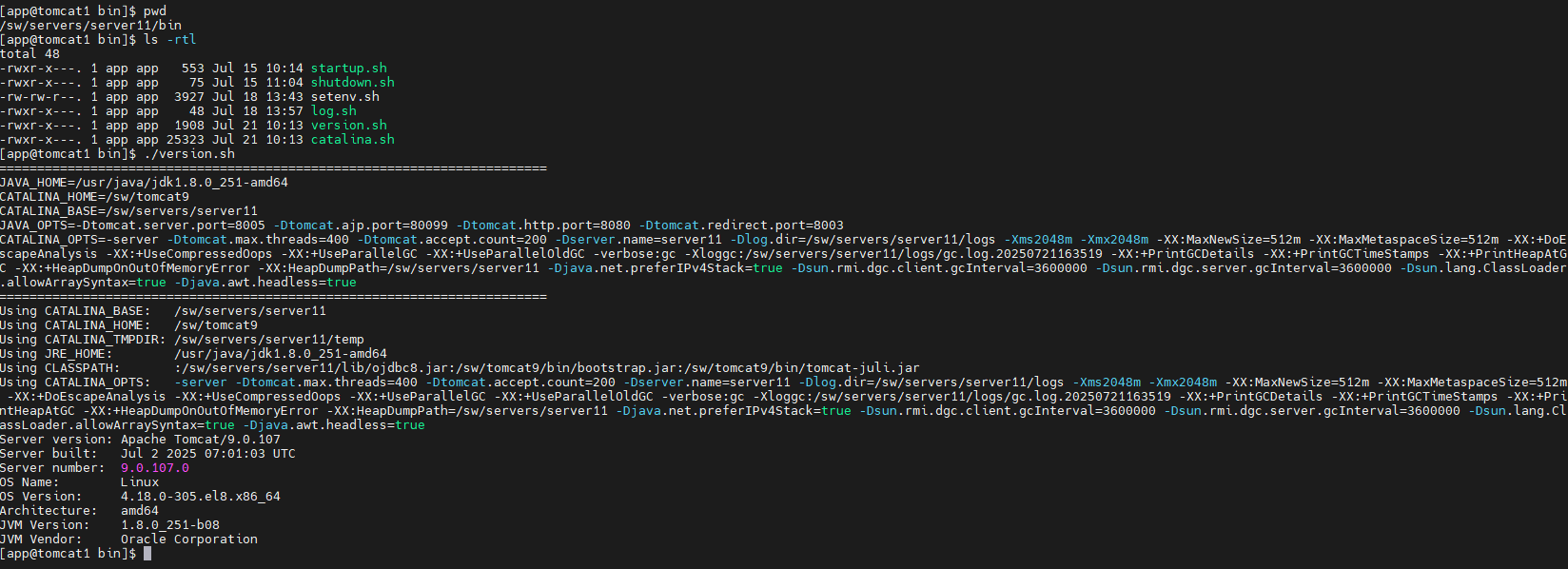
/sw/servers/${INSTANCE}/bin/version.sh을 실행하면 버전이 업그레이드 된 것을 확인

optional) /sw/servers/server11/bin에 위치한 version.sh & catalina.sh은 /sw/apache-tomcat-9.0.107/bin에 위치한 파일로 교체
'WAS > TOMCAT' 카테고리의 다른 글
| [tomcat9] web application 배포에 관련하여 (3) | 2025.07.18 |
|---|---|
| Session Clustering (멀티캐스트 아닌 방식) (0) | 2024.08.21 |
| appBase, docBase (0) | 2024.08.07 |
| 톰캣 - mysql 8 JNDI 연동 (0) | 2024.08.07 |
| 톰캣 멀티 인스턴스 구성 (0) | 2024.08.07 |


