짧막하게 테스트 겸 해서 기존에 구성되어 있던 톰캣 엔진과 인스턴스들을 싹 다 밀어버리고, 새로이 구성중에 있다.
그러면서 알게 된 사실들을 그냥 정리차 작성해 본다.
## Tomcat 문서상, <context> 설정을 conf/server.xml에 하는 것은 비추천 한다.
여러 블로그 글들을 보면, 보통의 Web Application 배포시에 server.xml내부에 appBase가 작성된 곳에 <context>를 추가하여
애플리케이션을 배포한다고 작성되어있다.
https://tomcat.apache.org/tomcat-9.0-doc/config/context.html
그런데 문서를 보면 다음과 같이 작성되어 있다.
Defining a context
It is NOT recommended to place <Context> elements directly in the server.xml file.
위의 이유는 재시작없이는 설정이 반영되지 않는다는 뜻으로 해석된다.
근데 또 밑에 보면 이렇게 써져 있다.
Individual Context elements may be explicitly defined:
- In an individual file at /META-INF/context.xml inside the application files. Optionally (based on the Host's copyXML attribute) this may be copied to $CATALINA_BASE/conf/[enginename]/[hostname]/ and renamed to application's base file name plus a ".xml" extension.
- In individual files (with a ".xml" extension) in the $CATALINA_BASE/conf/[enginename]/[hostname]/ directory. The context path and version will be derived from the base name of the file (the file name less the .xml extension). This file will always take precedence over any context.xml file packaged in the web application's META-INF directory.
- Inside a Host element in the main conf/server.xml.
이게 뭔..
정리하면 이런거 같다.
<context> 태그는 conf/server.xml 내의 <Host> 태그 하위에 작성하는 것은 가능하다. 근데 재시작을 해야 하니 권장 하진 않는다.
$CATALINA_BASE/conf/[enginename]/[hostname] 경로에 각각의 .xml로 구성
이 때, 파일의 이름은 web application의 이름을 따라가 주자. 그리고 web application의 이름을 따라가는 .xml 파일에 의해,
context-root 는 xml 파일의 이름을 따라감을 기억하자.
구성은 다음과 같이 진행하고 테스트 해보았다.
${CATALINA_BASE}/conf/${ENGINE}/${HOST}
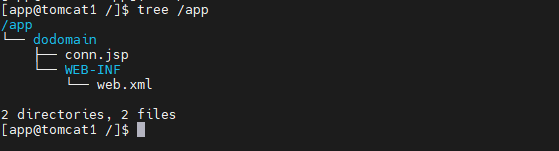
위의 경로의 dodomain.xml은 애플리케이션의 경로 역할을 담당. 그리고 xml의 파일명이 곧 context-root이다.

<Context docBase="/app/dodomain" reloadable="true" />
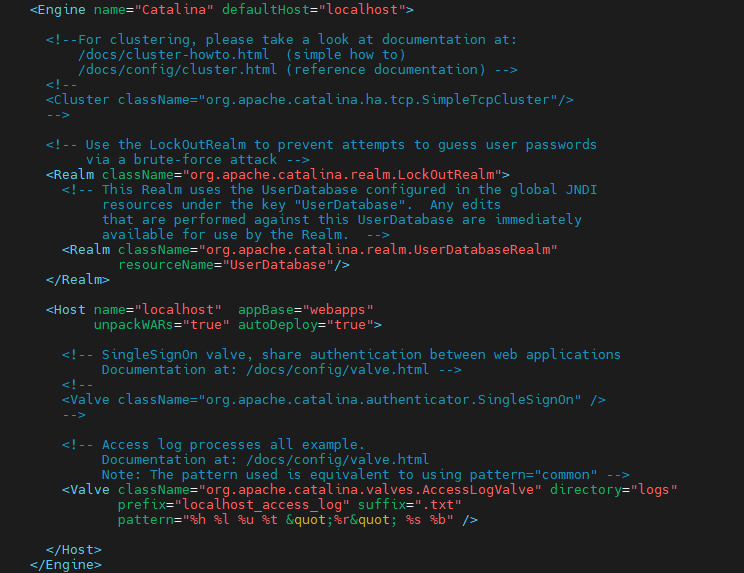
${CATALINA_BASE}/conf/server.xml 설정
<Engine name="Catalina" defaultHost="localhost">
<!--For clustering, please take a look at documentation at:
/docs/cluster-howto.html (simple how to)
/docs/config/cluster.html (reference documentation) -->
<!--
<Cluster className="org.apache.catalina.ha.tcp.SimpleTcpCluster"/>
-->
<!-- Use the LockOutRealm to prevent attempts to guess user passwords
via a brute-force attack -->
<Realm className="org.apache.catalina.realm.LockOutRealm">
<!-- This Realm uses the UserDatabase configured in the global JNDI
resources under the key "UserDatabase". Any edits
that are performed against this UserDatabase are immediately
available for use by the Realm. -->
<Realm className="org.apache.catalina.realm.UserDatabaseRealm"
resourceName="UserDatabase"/>
</Realm>
<Host name="localhost" appBase="webapps"
unpackWARs="true" autoDeploy="true">
<!-- SingleSignOn valve, share authentication between web applications
Documentation at: /docs/config/valve.html -->
<!--
<Valve className="org.apache.catalina.authenticator.SingleSignOn" />
-->
<!-- Access log processes all example.
Documentation at: /docs/config/valve.html
Note: The pattern used is equivalent to using pattern="common" -->
<Valve className="org.apache.catalina.valves.AccessLogValve" directory="logs"
prefix="localhost_access_log" suffix=".txt"
pattern="%h %l %u %t "%r" %s %b" />
</Host>
</Engine>보다시피, server.xml 상에는 별도의 설정을 하지 않았다.
앱 경로 : /app/dodomain
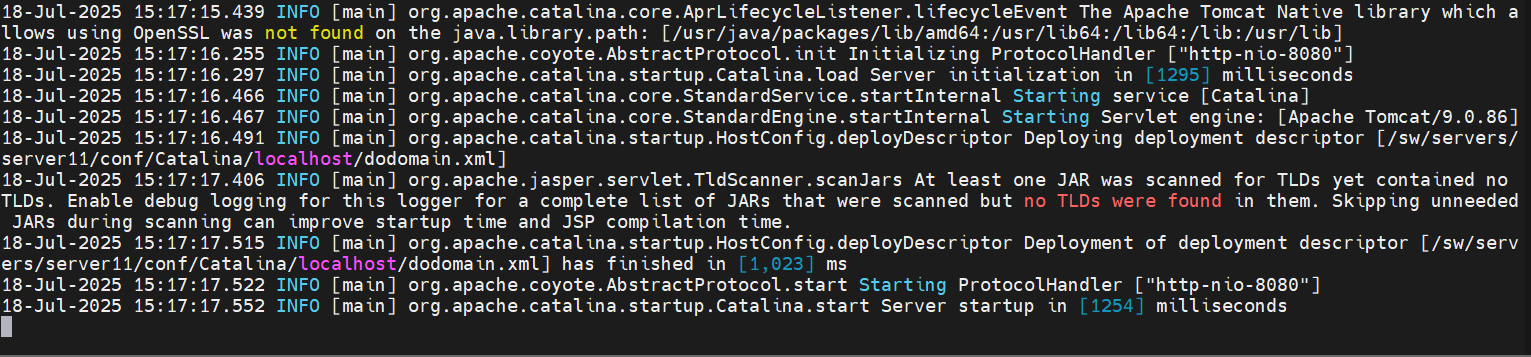
기동을 하게 되면,
INFO [main] org.apache.catalina.startup.HostConfig.deployDescriptor Deploying deployment descriptor [/sw/servers/server11/conf/Catalina/localhost/dodomain.xml] 이렇게 xml 파일을 물고 가는 것을 확인할 수 있다.
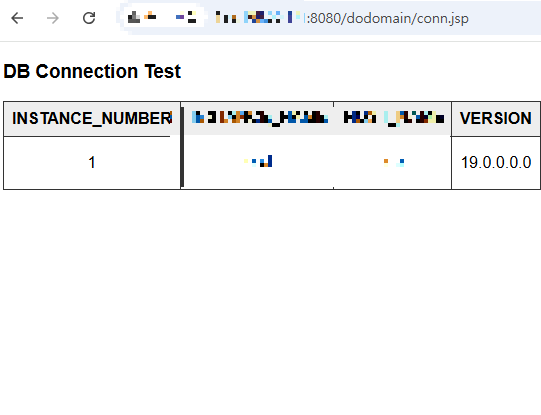
화면을 호출 해보면, $IP:$PORT/dodomain/conn.jsp 로 잘 호출된 것을 확인할 수 있다.
'WAS > TOMCAT' 카테고리의 다른 글
| [Tomcat9] 마이너 버전 업그레이드 정리 (5) | 2025.07.21 |
|---|---|
| Session Clustering (멀티캐스트 아닌 방식) (0) | 2024.08.21 |
| appBase, docBase (0) | 2024.08.07 |
| 톰캣 - mysql 8 JNDI 연동 (0) | 2024.08.07 |
| 톰캣 멀티 인스턴스 구성 (0) | 2024.08.07 |


