TCP를 이용하여 Clustering을 구성하기 위해서는,
애플리케이션이 배포된 상태여야 stack을 tcp로 변경한 이후에 TCP PORT가
netstat 명령어나, 관리 콘솔 상에 조회가 된다.
standalone-ha.xml에서 기본 udp인 jgroups 설정을 tcp로 변경해주어야 함
<channel name="ee" stack="tcp" cluster="ejb"/> 로 수정
<protocol type="org.jgroups.protocols.TCPPING">
<property name="initial_hosts">XX.XX.XX.101[7600], XX.XX.XX .101[7650]</property>
<property name="port_range">0</property>
</protocol>
       <subsystem xmlns="urn:jboss:domain:jgroups:8.0">
            <channels default="ee">
                <channel name="ee" stack="tcp" cluster="ejb"/>
            </channels>
            <stacks>
                <stack name="udp">
                    <transport type="UDP" socket-binding="jgroups-udp"/>
                    <protocol type="PING"/>
                    <protocol type="MERGE3"/>
                    <socket-protocol type="FD_SOCK" socket-binding="jgroups-udp-fd"/>
                    <protocol type="FD_ALL"/>
                    <protocol type="VERIFY_SUSPECT"/>
                    <protocol type="pbcast.NAKACK2"/>
                    <protocol type="UNICAST3"/>
                    <protocol type="pbcast.STABLE"/>
                    <protocol type="pbcast.GMS"/>
                    <protocol type="UFC"/>
                    <protocol type="MFC"/>
                    <protocol type="FRAG3"/>
                </stack>
                <stack name="tcp">
                    <transport type="TCP" socket-binding="jgroups-tcp"/>
                    <protocol type="org.jgroups.protocols.TCPPING">
                        <property name="initial_hosts">192.168.56.101[7600],192.168.56.101[7650]</property>
                        <property name="port_range">0</property>
                    </protocol>
                    <protocol type="MERGE3"/>
                    <socket-protocol type="FD_SOCK" socket-binding="jgroups-tcp-fd"/>
                    <protocol type="FD_ALL"/>
                    <protocol type="VERIFY_SUSPECT"/>
                    <protocol type="pbcast.NAKACK2"/>
                    <protocol type="UNICAST3"/>
                    <protocol type="pbcast.STABLE"/>
                    <protocol type="pbcast.GMS"/>
                    <protocol type="MFC"/>
                    <protocol type="FRAG3"/>
                </stack>
            </stacks>
        </subsystem>
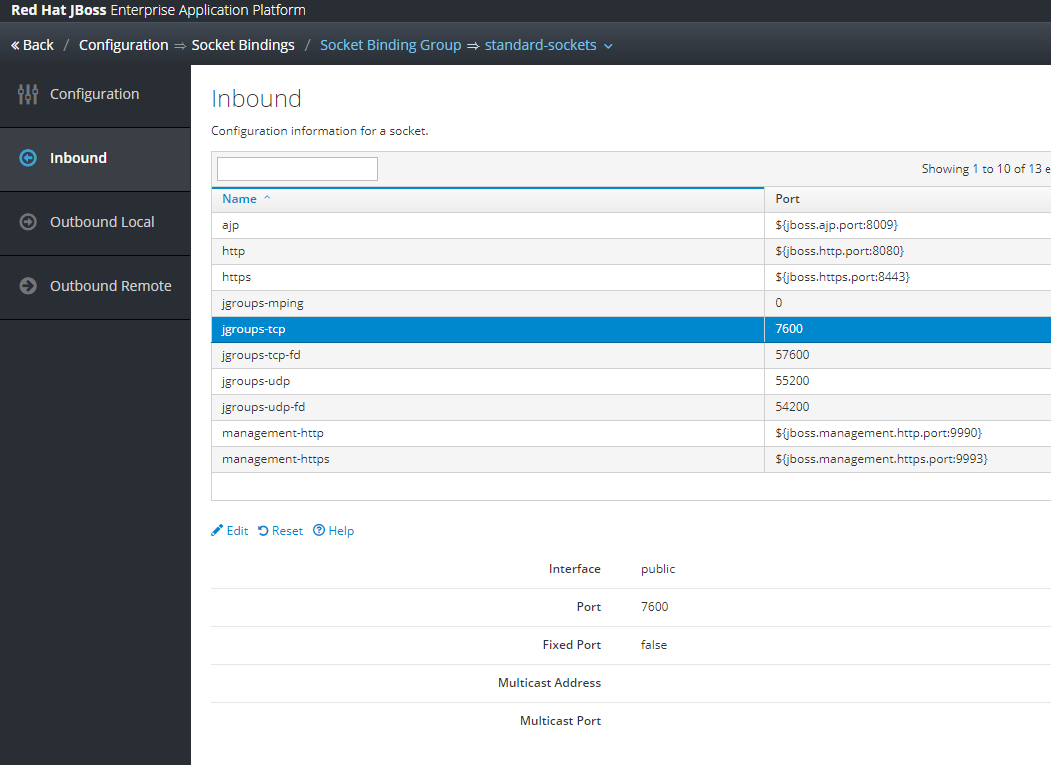

jgroups-tcp
jgroups-tcp-fd의 interface 를 pulic으로 변경
※ public으로 변경하는 이유는 initial_hosts 값을 IP 주소로 넣었기 때문
※ private으로 변경하는 이유는 initial_hosts 값을 127.0.0.1 주소로 넣을 것

cluster Member로 Join이 되면 다음의 로그를 확인 할 수 있다.
※ Session Clustering 테스트를 진행하고자 한다면, $APP/WEB-INF/web.xml 상에
<distributable/> 태그를 반드시 넣어주자.
[jboss-web.xml]
<jboss-web>
<context-root>/</context-root>
<replication-config>
<replication-trigger>SET</replication-trigger>
<replication-granularity>SESSION</replication-granularity>
</replication-config>
</jboss-web>
위와 같이 Context-root 셋팅과 session 공유 범위를 선택하는 replocation-config를 설정하였습니다.
trigger SET의 경우 SET이 발생하였을때 SESSION 정보를 Backup Server로 Copy하겠다는 의미 입니다.
granularity 범위는 Session에 한정됩니다.
[web.xml]
<?xml version="1.0" encoding="UTF-8"?>
xmlns:xsi="http://www.w3.org/2001/XMLSchema-instance"
xsi:schemaLocation="http://java.sun.com/xml/ns/javaee http://java.sun.com/xml/ns/javaee/web-app_3_0.xsd">
<session-config>
<session-timeout>30</session-timeout>
<!--tracking-mode>URL</tracking-mode-->
</session-config>
<distributable/>
</web-app>
'WAS > JBoss&WildFly' 카테고리의 다른 글
| [JBoss 7.4] thread 수 설정 (0) | 2024.02.08 |
|---|---|
| [JBoss 7.4] serverlog와 log4j 로그 별도 기록 (0) | 2024.01.02 |
| ${JBOSS_CONF_DIR}/standalone_xml_history 경로 권한 변경 시 기동 오류 발생 (1) | 2023.12.26 |
| [JBoss 7.4] Hot Deploy 설정 (0) | 2023.11.27 |
| [JBoss EAP 7 / Standalone] 설치 및 구성 (0) | 2023.10.18 |


