728x90
Chapter 17. Configuring the Web Server (Undertow) | Configuration Guide | Red Hat JBoss Enterprise Application Platform | 7.4
Red Hat JBoss Enterprise Application Platform FormatMulti-pageSingle-pageView full doc as PDF
docs.redhat.com
17.11 항목에 설명되어 있다.
기본적으로 애플리케이션의 WEB-INF/web.xml 상에 <session-timeout> 으로 선언하지만,
JBoss EAP 상에 선언할 수도 있다. JBoss 상에 선언을 하게 되면, JBoss에 배포된 애플리케이션 전역적으로 적용되는데,
WEB-INF/web.xml 상에 명시된 것이 전역 설정을 덮어 씌운다.
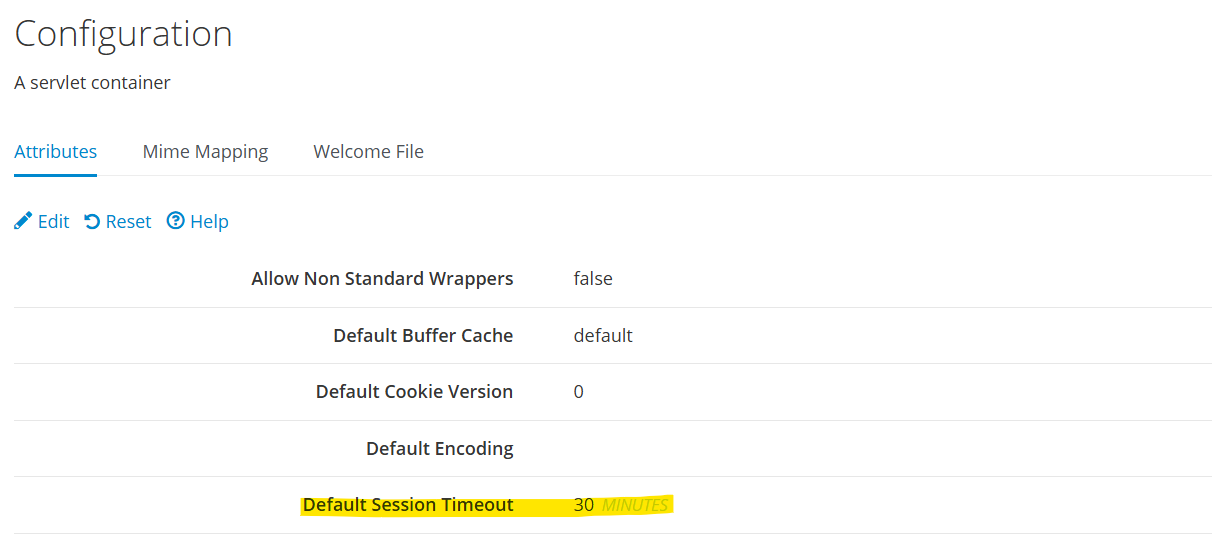
단위는 분(minutes) 이며, default 값은 30이다. 즉, 30분이 default session timeout 값이다.
[관리 콘솔 상에서 적용]
Configuration - Subsystems - Web(undertow) - Servlet Container - default - View 클릭
[jboss-cli 적용 법]
/subsystem=undertow/servlet-container=default:write-attribute(name=default-session-timeout, value=60)
적용되는 설정 파일은 JBoss 기동시에 참조한 설정파일(ex. standalone-ha.xml) 에 저장된다.
[BEFORE - ※ default값은 초기 설정파일에는 드러나지 않는다.]

<servlet-container name="default">
    <jsp-config/>
    <websockets/>
</servlet-container>


[AFTER]
<servlet-container name="default" default-session-timeout="60">
    <jsp-config/>
    <websockets/>
</servlet-container>
수정 후 Reload 필요.
그냥 재시작하자.
'WAS > JBoss&WildFly' 카테고리의 다른 글
| log4j 설정 관련 추가 정리 (0) | 2026.03.24 |
|---|---|
| http method 제한 (0) | 2026.03.16 |
| wildfly23 - postgresql 13 연동 (1) | 2026.03.12 |
| [JBoss EAP 7] 세션 병렬 처리 관련 지원 ISPN000136/ISPN000299 (1) | 2026.03.10 |
| [JBoss 7] access log 설정 (0) | 2026.03.10 |