1. java connector 파일 다운로드
https://mariadb.com/docs/connectors/mariadb-connector-j/about-mariadb-connector-j
About MariaDB Connector/J Guide | Connectors | MariaDB Documentation
Complete MariaDB Connector/J guide for Java. Complete JDBC driver reference for connections, prepared statements, and transactions for production use.
mariadb.com
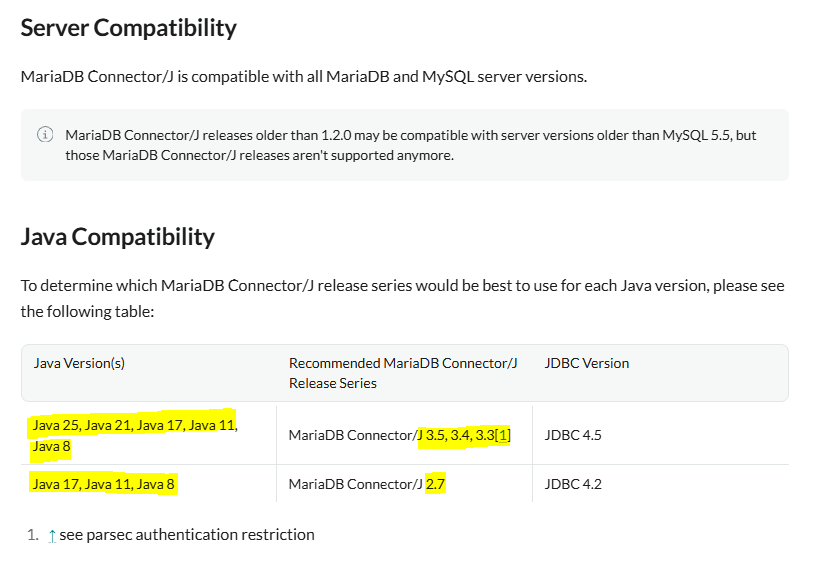
다운로드 받은 connector 파일을 ${JBOSS_HOME}/modules/system/layers/base/org/mariadb/main에 옮김.
또한 ${JBOSS_HOME}/modules/system/layers/base/org/mariadb/main 경로에 module.xml을 정의.
※ 참고로 ${JBOSS_HOME}/modules/system/layers/base/org 하위 경로에는 mariadb 경로가 없다.
그러니 mkdir -p로 mariadb/main 경로를 생성하자.

[app@test11 main]$ cat module.xml
<?xml version="1.0" encoding="UTF-8"?>
<module xmlns="urn:jboss:module:1.9" name="org.mariadb">
  <resources>
    <resource-root path="mariadb-java-client-3.5.7.jar"/>
  </resources>
  <dependencies>
    <module name="javax.api"/>
    <module name="javax.transaction.api"/>
  </dependencies>
</module>
[관리 콘솔 방식]
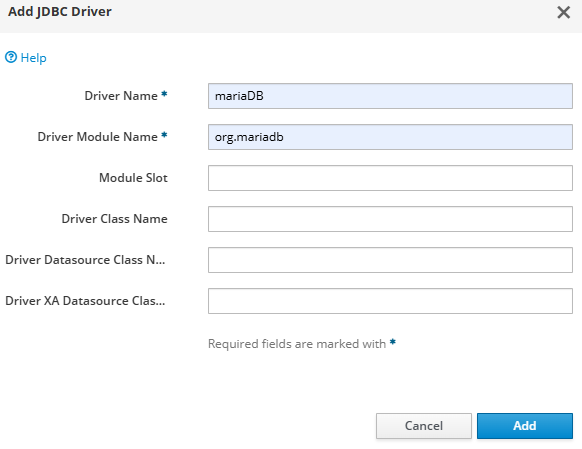
콘솔 - configuration - subsystems - Datasources& Drivers - JDBC Drivers - Add

Driver 이름은 아무렇게나, Driver Module Name은 module.xml 작성한 내용으로 진행.
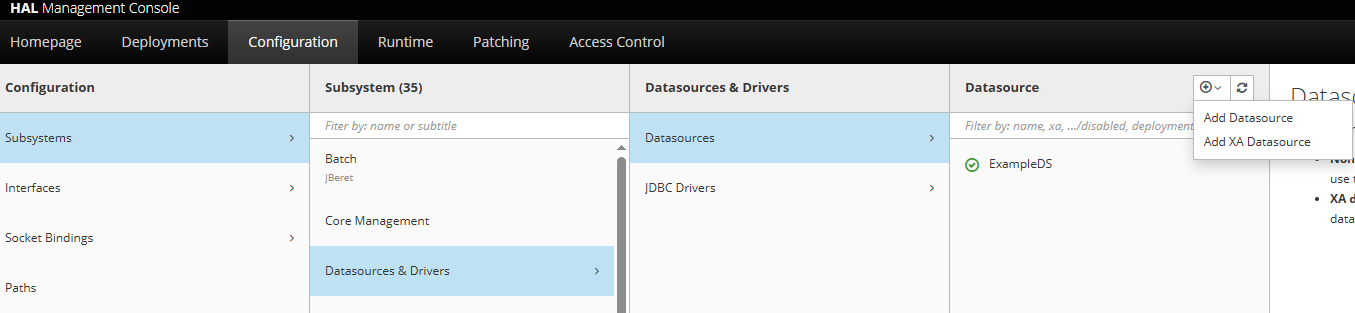
추가를 마친 후, 콘솔 - configuration - subsystems - Datasources& Drivers - Datasources 에서 Add Datasource
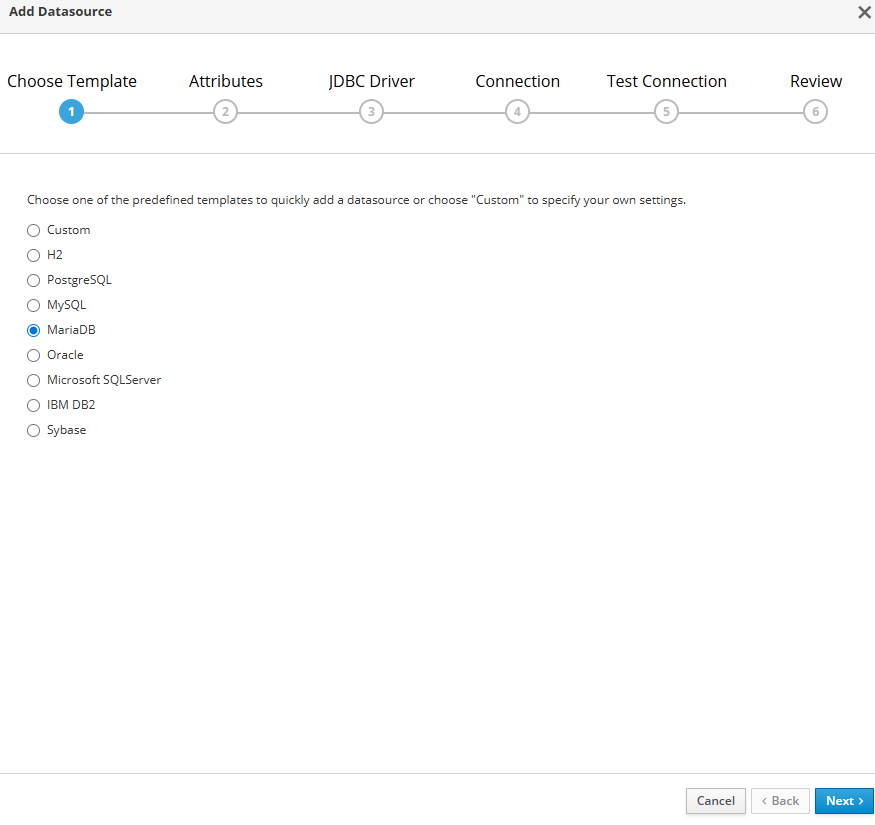
MariaDB 클릭 후 Next
데이터 소스 이름 및 JNDI 설정.
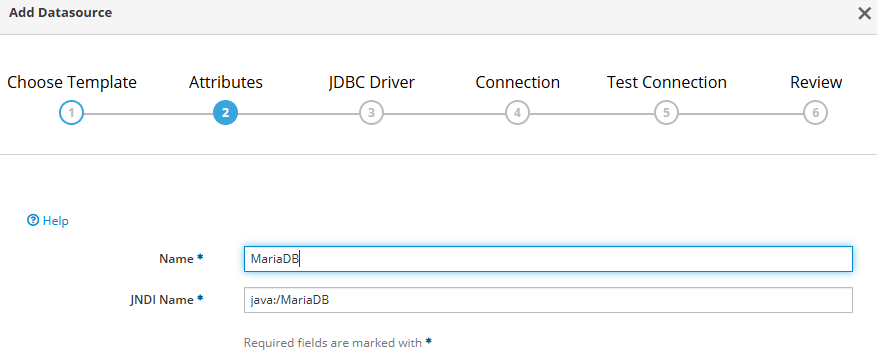
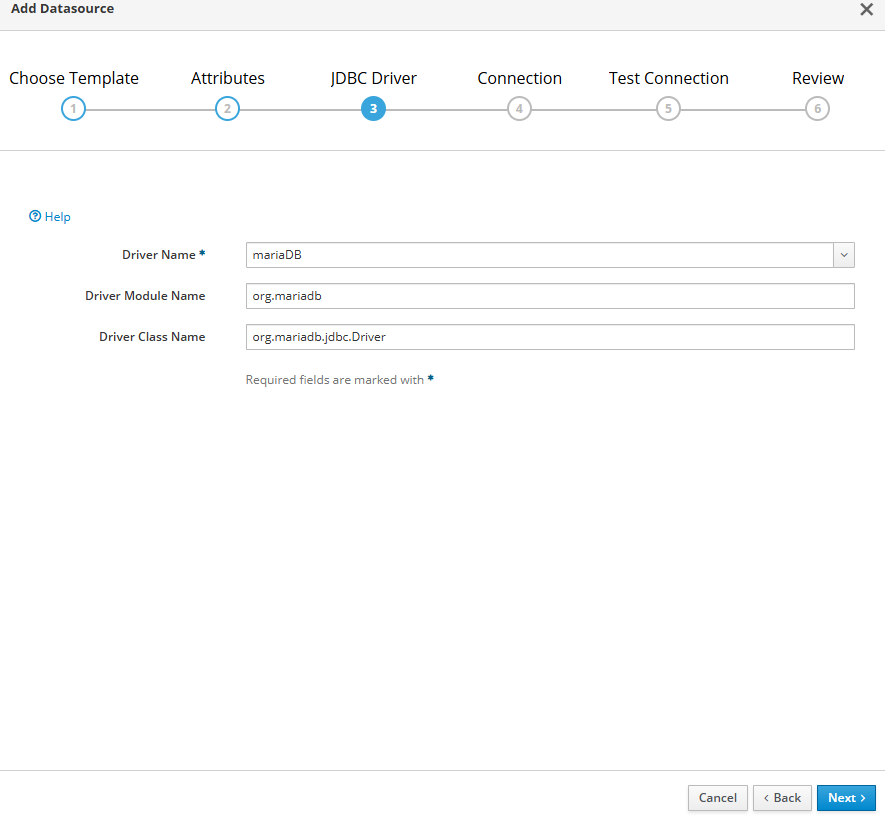
Driver는 아까 생성한 Driver를 선택, Driver Module과 Class Name 정의.
appdb 라는 db를 사용할 예정.

Connection URL 작성 : jdbc:mariadb://192.168.56.104:3306/appdb
DB의 ID PWD도 작성 하고 Next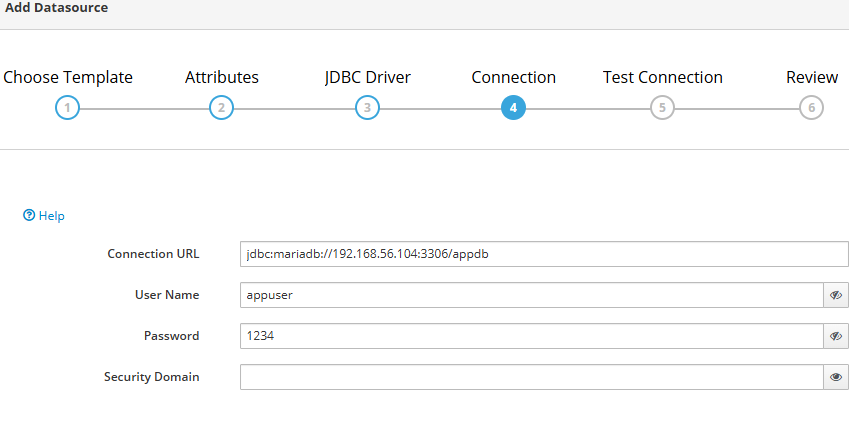
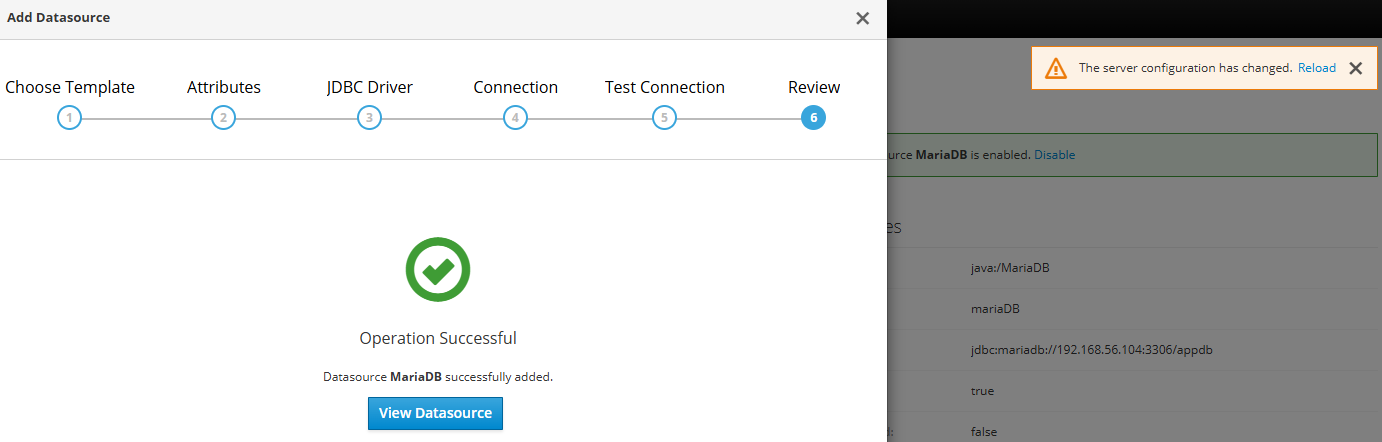
다 했으면, Test Connection
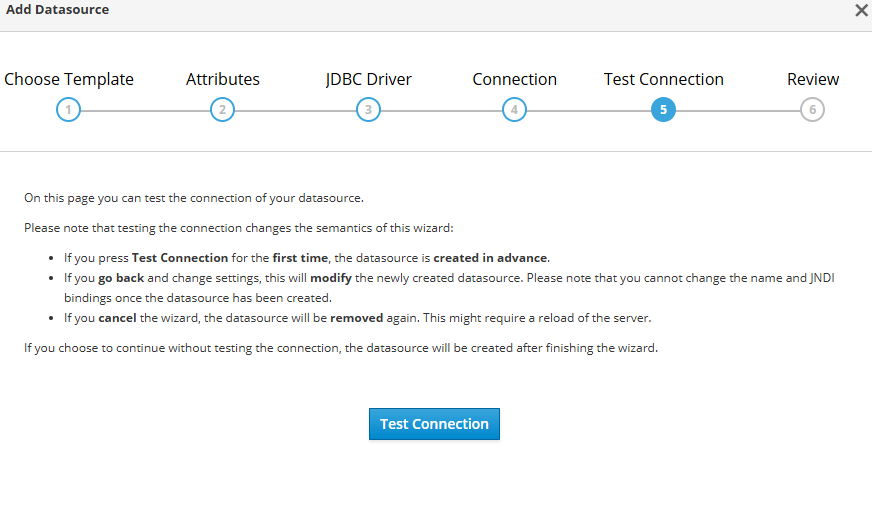
잘 되면 이런 화면이 나온다.

리로드 후에 테스트 용 앱 배포
테스트 페이지를 호출하면 이렇게 나온다.

테스트 용 DB 테이블 및 데이터
//사용 할 DB에 접근
USE appdb;

//기존에 있는 테이블이면 삭제
DROP TABLE IF EXISTS test_table;

//테이블 생성
CREATE TABLE test_table (
    id INT AUTO_INCREMENT PRIMARY KEY,
    name VARCHAR(50),
    message VARCHAR(200),
    created_at TIMESTAMP DEFAULT CURRENT_TIMESTAMP
);

//테이블에 값 넣기
INSERT INTO test_table (name, message) VALUES
('josh', 'JBoss datasource test'),
('admin', 'Hello MariaDB'),
('test', 'Connection OK');

//테스트 차 조회
SELECT * FROM test_table;
테스트 JSP 파일 코드
<%@ page contentType="text/html; charset=UTF-8" pageEncoding="UTF-8" %>
<%@ page import="java.sql.*" %>
<%@ page import="javax.naming.InitialContext" %>
<%@ page import="javax.sql.DataSource" %>
<!DOCTYPE html>
<html>
<head>
  <meta charset="UTF-8" />
  <title>MariaDB Datasource Test</title>
  <style>
    table { border-collapse: collapse; margin-top: 12px; }
    th, td { border: 1px solid #444; padding: 8px 10px; }
    th { background: #f2f2f2; }
    .ok { color: #1b7f2a; }
    .err { color: #b00020; white-space: pre-wrap; }
    code { background: #f6f8fa; padding: 2px 6px; border-radius: 4px; }
  </style>
</head>
<body>

<h2>JBoss/WildFly MariaDB Datasource 조회 테스트</h2>

<%
  // JNDI 후보(네가 등록한 이름에 맞게 하나만 써도 됨)
  String[] jndiCandidates = {
      "java:/MariaDS",
      "java:jboss/datasources/MariaDS"
  };

  DataSource ds = null;
  String usedJndi = null;

  try {
      InitialContext ctx = new InitialContext();

      for (String jndi : jndiCandidates) {
          try {
              ds = (DataSource) ctx.lookup(jndi);
              usedJndi = jndi;
              break;
          } catch (Exception ignore) {
              // 다음 후보 시도
          }
      }

      if (ds == null) {
          throw new Exception("DataSource lookup failed. Tried: java:/MariaDS, java:jboss/datasources/MariaDS");
      }
%>

<p class="ok">✅ DataSource lookup 성공: <code><%= usedJndi %></code></p>

<%
      // 자원은 try-with-resources로 안전하게 close
      String sql = "SELECT id, name, message, created_at FROM test_table ORDER BY id";

      try (Connection conn = ds.getConnection();
           PreparedStatement ps = conn.prepareStatement(sql);
           ResultSet rs = ps.executeQuery()) {

%>

<table>
  <tr>
    <th>ID</th>
    <th>Name</th>
    <th>Message</th>
    <th>Created At</th>
  </tr>
<%
        boolean hasRow = false;
        while (rs.next()) {
            hasRow = true;
%>
  <tr>
    <td><%= rs.getInt("id") %></td>
    <td><%= rs.getString("name") %></td>
    <td><%= rs.getString("message") %></td>
    <td><%= rs.getTimestamp("created_at") %></td>
  </tr>
<%
        }
        if (!hasRow) {
%>
  <tr>
    <td colspan="4">(no rows)</td>
  </tr>
<%
        }
%>
</table>

<%
      } // try-with-resources end

  } catch (Exception e) {
%>

<p class="err">❌ ERROR: <%= e.toString() %></p>

<%
      // 원인 스택도 보고 싶으면 아래 주석 해제
      // e.printStackTrace(new java.io.PrintWriter(out));
  }
%>

<hr/>
<p>DB 시간/버전 확인:</p>
<%
  try {
      if (ds != null) {
          try (Connection conn = ds.getConnection();
               PreparedStatement ps = conn.prepareStatement("SELECT NOW() AS db_time, VERSION() AS db_version");
               ResultSet rs = ps.executeQuery()) {
              if (rs.next()) {
%>
  <ul>
    <li>db_time: <code><%= rs.getString("db_time") %></code></li>
    <li>db_version: <code><%= rs.getString("db_version") %></code></li>
  </ul>
<%
              }
          }
      }
  } catch (Exception ignore) {}
%>

</body>
</html>
'WAS > JBoss&WildFly' 카테고리의 다른 글
| [JBoss 7] access log 설정 (0) | 2026.03.10 |
|---|---|
| Reverse Proxy 설정 (0) | 2026.03.09 |
| Request Dumping 설정 (0) | 2026.01.23 |
| [JBoss 7/8] welcome-content 비활성화 (0) | 2026.01.20 |
| [JBoss 7.4] max parameter 설정 (0) | 2026.01.08 |
